- English
- Español
- Português
- русский
- Français
- 日本語
- Deutsch
- tiếng Việt
- Italiano
- Nederlands
- ภาษาไทย
- Polski
- 한국어
- Svenska
- magyar
- Malay
- বাংলা ভাষার
- Dansk
- Suomi
- हिन्दी
- Pilipino
- Türkçe
- Gaeilge
- العربية
- Indonesia
- Norsk
- تمل
- český
- ελληνικά
- український
- Javanese
- فارسی
- தமிழ்
- తెలుగు
- नेपाली
- Burmese
- български
- ລາວ
- Latine
- Қазақша
- Euskal
- Azərbaycan
- Slovenský jazyk
- Македонски
- Lietuvos
- Română
- Slovenski
- Eesti Keel

How Can the Tuya App Wifi Smart Door Lock Enhance Your Home Security
Article Summary: In today's fast-paced world, home security is a top priority. The Tuya App Wifi Smart Door Lock by Paramey provides a secure and convenient solution for modern homeowners. This blog explores the features, advantages, and installation process of this smart lock, showcasing how it can transform your home security system.
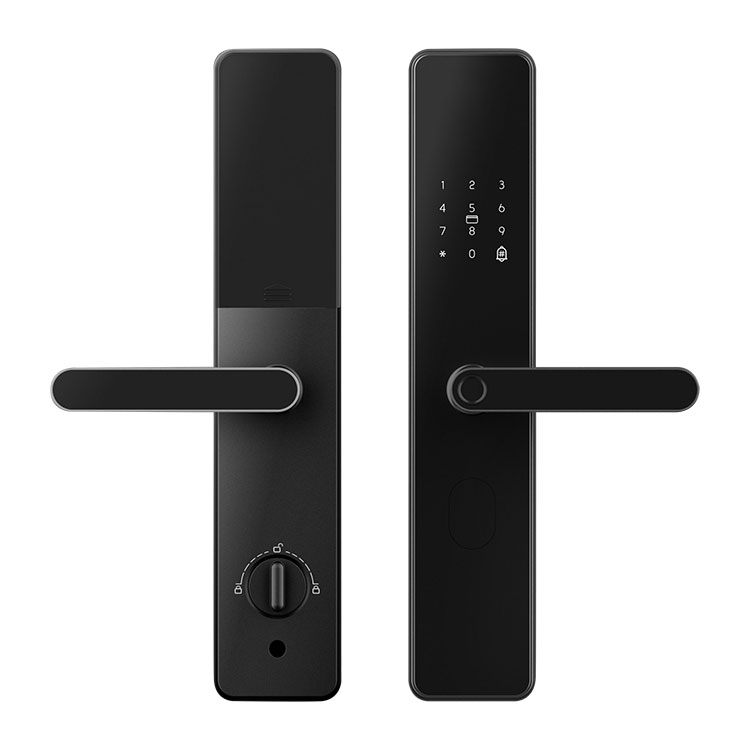
Table of Contents
- Introduction
- Key Features of Tuya App Wifi Smart Door Lock
- Why Choose Tuya App Wifi Smart Door Lock?
- How to Install Tuya App Wifi Smart Door Lock?
- How Secure Is the Tuya App Wifi Smart Door Lock?
- FAQ
- Contact Us
Introduction
Home security has evolved significantly over the years. With the rise of smart home technology, traditional locks are being replaced by more advanced, secure solutions. One such innovation is the Tuya App Wifi Smart Door Lock by Paramey. This device combines state-of-the-art security features with the convenience of a mobile app to help you manage access to your home effortlessly. Whether you're looking to upgrade your home security or simply want a more modern locking system, the Tuya App Wifi Smart Door Lock is an excellent choice.
Key Features of Tuya App Wifi Smart Door Lock
| Feature | Description |
|---|---|
| Wi-Fi Connectivity | Allows remote access to lock and unlock your door via the Tuya App from anywhere. |
| Multiple Access Methods | Unlock your door using a password, fingerprint, RFID card, or mobile app. |
| Real-Time Alerts | Receive instant notifications on your mobile device when the door is unlocked or accessed. |
| Security Encryption | Utilizes AES 128-bit encryption for enhanced data security and protection. |
| Low Battery Alert | Alerts you when the battery level is low, ensuring you never get locked out. |
Why Choose Tuya App Wifi Smart Door Lock?
- Convenience: The Tuya App Wifi Smart Door Lock offers unparalleled convenience, allowing you to manage your home’s security with just a few taps on your smartphone.
- Advanced Security: With multiple methods of access (passwords, fingerprint recognition, RFID), this lock ensures only authorized individuals can gain entry to your home.
- Remote Control: Control your door lock remotely from anywhere, ideal for homeowners who travel often or want to grant temporary access to others without physical keys.
- Easy Installation: The lock can be easily installed on most doors, making it an excellent option for DIYers looking for a quick security upgrade.
- Low Maintenance: The Tuya App Wifi Smart Door Lock has a long-lasting battery and provides alerts when the battery runs low, ensuring smooth operation.
How to Install Tuya App Wifi Smart Door Lock?
Installing the Tuya App Wifi Smart Door Lock is a simple process that requires minimal tools and expertise. Below are the steps to install it:
- Ensure that your door is compatible with the lock's size and specifications.
- Remove any existing locks and hardware from the door.
- Install the lock according to the instructions provided in the manual. Typically, this involves fixing the internal and external components of the lock into place.
- Download the Tuya App on your smartphone from Google Play or the App Store.
- Follow the app's setup instructions to connect the lock to your Wi-Fi network and configure your access options (password, fingerprint, etc.).
- Test the lock to ensure it works smoothly, and enjoy your new secure door lock system.
How Secure Is the Tuya App Wifi Smart Door Lock?
The Tuya App Wifi Smart Door Lock is designed with security as its top priority. It uses AES 128-bit encryption to protect the communication between the lock and your mobile app, ensuring that no unauthorized individuals can gain access to your home. Additionally, the lock features multiple methods of access, including fingerprint recognition, which is one of the most secure forms of biometric authentication.
Furthermore, the Tuya App Wifi Smart Door Lock allows you to monitor access in real-time and receive notifications when the lock is accessed, providing you with an added layer of security and peace of mind.
FAQ
1. How do I reset the Tuya App Wifi Smart Door Lock?
To reset the lock, locate the reset button on the lock's inner panel and hold it down for 10-15 seconds. Once the lock resets, follow the setup instructions in the app to reconnect the lock to your Wi-Fi network.
2. Can I use the Tuya App Wifi Smart Door Lock without Wi-Fi?
While the lock can function without Wi-Fi for local access methods such as fingerprint and password unlocking, Wi-Fi connectivity is required for remote access and real-time alerts.
3. How long does the battery last?
The battery life of the Tuya App Wifi Smart Door Lock typically lasts between 6-12 months, depending on usage. You will receive an alert when the battery is low, so you can replace it before running out of power.
4. Is the Tuya App Wifi Smart Door Lock compatible with all doors?
The lock is compatible with most standard doors. However, we recommend checking the lock's size and specifications to ensure it fits your door before purchasing.
5. Can I grant temporary access to others?
Yes, you can grant temporary access to others through the Tuya App by creating virtual keys or setting time-limited access codes for guests or service providers.
Contact Us
Are you interested in upgrading your home security? The Tuya App Wifi Smart Door Lock by Paramey is the perfect solution for modern homeowners. For more information or to purchase the lock, contact us today and secure your home with ease!